


Announce the mindm-20plus mcp server project that supplement the original mindm-mcp server
Voting Open
https://github.com/robertZaufall/mindm/issues/1#issuecomment-3531418081
its still just a proof of concept, but these days with claude code and the new cc web,
it's closer than before. and i tested the original mindm-mcp could work with mm20,
with claude desktop, with sandboxie. all went further than before.
in summary,
the workflow of info:
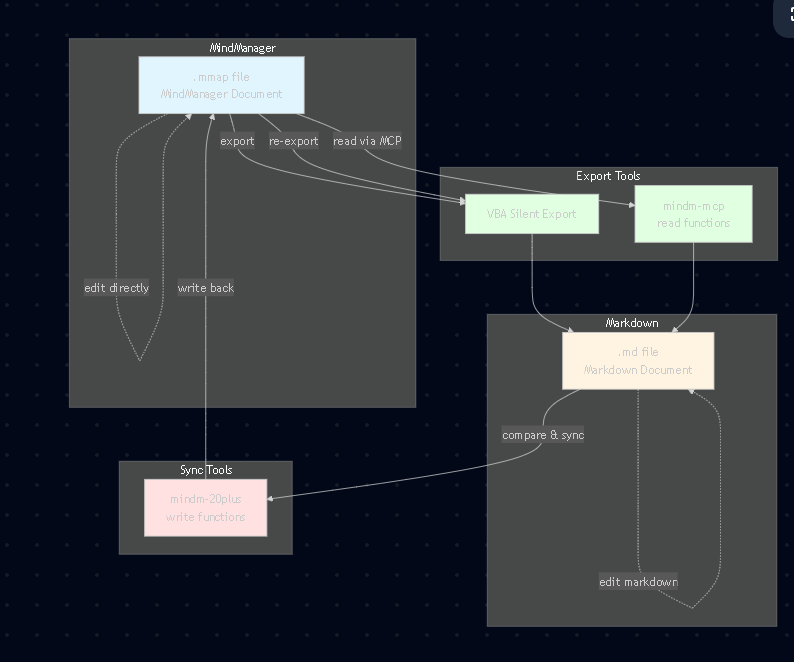
so finally, if you think of markdown .md files as the level ground, now .mmap is a tall building. and you have a lift that send things down; and we are making the lift able to send up. thus connect everything together finally.
 I like this idea
btw, the original mindm-mcp is MIT license; for my mcp server, those code from mindm-mcp will ofcoz be MIT license (a must).
for codes that claude code generated, it will also be MIT if used for FOSS, and it will need commercial if used for business or something.
thanks
btw, the original mindm-mcp is MIT license; for my mcp server, those code from mindm-mcp will ofcoz be MIT license (a must).
for codes that claude code generated, it will also be MIT if used for FOSS, and it will need commercial if used for business or something.
thanks
you can now ask LLMs to read (thru mindm-mcp) and write (thru my mindm-20plus) i.e. modify for you.
the prompt used:
prompt: i wanna a single topic of causes of abc [ohcm, uptodate], which contains all the 6 subtopics. for those 6 subtopics, add the reference in [ ] at the end say aaa [uptodate] 111[ohcm].
comments are wellcome
https://github.com/robertZaufall/mindm/issues/1#issuecomment-2767541259
tags
LLM
AI
mcp server
you can now ask LLMs to read (thru mindm-mcp) and write (thru my mindm-20plus) i.e. modify for you.
the prompt used:
prompt: i wanna a single topic of causes of abc [ohcm, uptodate], which contains all the 6 subtopics. for those 6 subtopics, add the reference in [ ] at the end say aaa [uptodate] 111[ohcm].
comments are wellcome
https://github.com/robertZaufall/mindm/issues/1#issuecomment-2767541259
tags
LLM
AI
mcp server
could be done partly by my previous VBA macros.
sometimes macros faster, but when complex, LLMs may help
could be done partly by my previous VBA macros.
sometimes macros faster, but when complex, LLMs may help
🎯 MindManager + AI: Bidirectional Workflow via Mermaid
The Setup:
A new tool (mindm-mcp) enables round-trip editing between MindManager and AI/text editors using Mermaid format as the bridge.
My Workflow:
1. Export: testing.mmap → MCP server → testing.mmap#assets/testing.mermaid (asset folder, like Typora style)
2. Edit anywhere:
- AI assistants (Claude, ChatGPT) can read and modify the .mermaid
- Humans can edit in Obsidian (split view: code left, preview right)
- Both work on the same file
3. Import back: Updated .mermaid → MCP server → overwrites testing.mmap
4. Version control:
- Timestamped backups: testing-20241116-1430.mmap, testing-20241116-1430.mermaid
- Latest always named testing.mmap / testing.mermaid (keeps hyperlinks valid)
Why This Matters:
- Preserves everything: links, tags, notes, images, icons, relationships
- AI + Human collaboration: AI does heavy lifting, you refine in familiar tools
- Text-based versioning: Track changes like code, not binary files
- No lock-in: Mermaid is open standard, works with any tool
Example Use Cases:
- AI expands outline → you refine in Obsidian → sync back to MindManager
- Collaborative editing via Git + Mermaid text files
- Automated map generation from templates
Technical:
- Open source: https://github.com/robertZaufall/mindm-mcp
my supplement mindm-20plus later. (for directly write functions)
- Requires MindManager 20+ (Windows/macOS)
- Works with Claude Desktop, VSCode, or any MCP-compatible client
*This transforms MindManager from isolated tool to part of a modern AI-assisted workflow.
https://github.com/robertZaufall/mindm-mcp
🎯 MindManager + AI: Bidirectional Workflow via Mermaid
The Setup:
A new tool (mindm-mcp) enables round-trip editing between MindManager and AI/text editors using Mermaid format as the bridge.
My Workflow:
1. Export: testing.mmap → MCP server → testing.mmap#assets/testing.mermaid (asset folder, like Typora style)
2. Edit anywhere:
- AI assistants (Claude, ChatGPT) can read and modify the .mermaid
- Humans can edit in Obsidian (split view: code left, preview right)
- Both work on the same file
3. Import back: Updated .mermaid → MCP server → overwrites testing.mmap
4. Version control:
- Timestamped backups: testing-20241116-1430.mmap, testing-20241116-1430.mermaid
- Latest always named testing.mmap / testing.mermaid (keeps hyperlinks valid)
Why This Matters:
- Preserves everything: links, tags, notes, images, icons, relationships
- AI + Human collaboration: AI does heavy lifting, you refine in familiar tools
- Text-based versioning: Track changes like code, not binary files
- No lock-in: Mermaid is open standard, works with any tool
Example Use Cases:
- AI expands outline → you refine in Obsidian → sync back to MindManager
- Collaborative editing via Git + Mermaid text files
- Automated map generation from templates
Technical:
- Open source: https://github.com/robertZaufall/mindm-mcp
my supplement mindm-20plus later. (for directly write functions)
- Requires MindManager 20+ (Windows/macOS)
- Works with Claude Desktop, VSCode, or any MCP-compatible client
*This transforms MindManager from isolated tool to part of a modern AI-assisted workflow.
https://github.com/robertZaufall/mindm-mcp
may be can have a updated .md from the .mmap too.
may be can have a updated .md from the .mmap too.
could use both .memraid and .md indeep:
---
🎯 MindManager + AI: Dual-Format Workflow
The Setup:
New tool (mindm-mcp) enables round-trip editing via Mermaid, while Markdown provides human-friendly reference copies.
Complete Workflow:
1. Primary: Bidirectional Mermaid
- testing.mmap → MCP → testing.mmap#assets/testing.mermaid
- Edit in AI (Claude/ChatGPT) or Obsidian (split view: code/preview)
- Import back: .mermaid → MCP → testing.mmap
- Preserves: links, tags, notes, images, icons, relationships
2. Secondary: Auto-generated Markdown
- Every .mmap save → VBA macro → testing.mmap#assets/testing.md
- For: quick reading, full-text search, simple edits, other tools
- Human-readable linear format
3. Version Control:
- Timestamped backups: testing-20241116-1430.mmap/mermaid/md
- Latest files: no timestamp (keeps hyperlinks valid)
Why Both Formats?
- Mermaid: Round-trip editing with full fidelity
- Markdown: Fast browsing, search, compatibility with note-taking tools
- Together: Best of both worlds
Use Cases:
- AI brainstorms in Mermaid → you review in Markdown → refine in Obsidian → sync to MindManager
- Search across all .md files in Obsidian, jump to .mmap when needed
- Git-track both formats for complete history
---
MindManager becomes a node in your knowledge workflow, not an island. Interested?
---
could use both .memraid and .md indeep:
---
🎯 MindManager + AI: Dual-Format Workflow
The Setup:
New tool (mindm-mcp) enables round-trip editing via Mermaid, while Markdown provides human-friendly reference copies.
Complete Workflow:
1. Primary: Bidirectional Mermaid
- testing.mmap → MCP → testing.mmap#assets/testing.mermaid
- Edit in AI (Claude/ChatGPT) or Obsidian (split view: code/preview)
- Import back: .mermaid → MCP → testing.mmap
- Preserves: links, tags, notes, images, icons, relationships
2. Secondary: Auto-generated Markdown
- Every .mmap save → VBA macro → testing.mmap#assets/testing.md
- For: quick reading, full-text search, simple edits, other tools
- Human-readable linear format
3. Version Control:
- Timestamped backups: testing-20241116-1430.mmap/mermaid/md
- Latest files: no timestamp (keeps hyperlinks valid)
Why Both Formats?
- Mermaid: Round-trip editing with full fidelity
- Markdown: Fast browsing, search, compatibility with note-taking tools
- Together: Best of both worlds
Use Cases:
- AI brainstorms in Mermaid → you review in Markdown → refine in Obsidian → sync to MindManager
- Search across all .md files in Obsidian, jump to .mmap when needed
- Git-track both formats for complete history
---
MindManager becomes a node in your knowledge workflow, not an island. Interested?
---
🎯 Breaking MindManager's Walled Garden: Your Future Exit Strategy
Let's Be Honest:
MindManager has serious issues:
- ❌ Closed source, expensive ($349+/year)
- ❌ Windows/macOS only - no Linux version
- ❌ No mobile version (in 2024!)
- ❌ Vendor lock-in with proprietary .mmap format
- ❌ Old-school company (Canada-based, US-aligned), slow innovation
The Game-Changer:
mindm-mcp converts .mmap ↔ Mermaid (open standard). This isn't just about working with MindManager - it's your exit strategy.
Why Mermaid Matters:
- Industry standard: Any future mind mapping tool can import Mermaid
- Your data is portable: Not locked in proprietary .mmap format
- Ready to migrate: When a better competitor emerges (open-source, Linux-compatible, mobile-ready), your entire library transfers via .mermaid files
The Workflow:
1. map.mmap → map.mermaid (open text format)
2. Edit with AI tools, Obsidian, any text editor (even Linux!)
3. map.mermaid → map.mmap (for now)
4. Auto map.md backup via VBA (human-readable)
Future Scenario:
Competitor launches with:
- ✅ Open source
- ✅ Linux/mobile support
- ✅ Mermaid import
You migrate in minutes - just import your .mermaid library. Zero rewrite.
Today's Benefits:
- Reduce dependency: Work in open formats 80% of time
- Platform flexibility: Edit .mermaid on Linux, render on Windows VM when needed
- AI collaboration: Claude/ChatGPT work directly with your maps
- Insurance policy: Your work survives if MindManager dies
Real Talk:
This isn't about loyalty to MindManager - it's about protecting your investment. Use MM today, but keep your data in open formats so you're NOT trapped when something better arrives.
Technical:
- mindm-mcp (open source): https://github.com/robertZaufall/mindm-mcp
- Still needs MindManager 20+ for now
- But your DATA is future-proof
Anyone else thinking about their exit strategy? What features would make you switch?
🎯 Breaking MindManager's Walled Garden: Your Future Exit Strategy
Let's Be Honest:
MindManager has serious issues:
- ❌ Closed source, expensive ($349+/year)
- ❌ Windows/macOS only - no Linux version
- ❌ No mobile version (in 2024!)
- ❌ Vendor lock-in with proprietary .mmap format
- ❌ Old-school company (Canada-based, US-aligned), slow innovation
The Game-Changer:
mindm-mcp converts .mmap ↔ Mermaid (open standard). This isn't just about working with MindManager - it's your exit strategy.
Why Mermaid Matters:
- Industry standard: Any future mind mapping tool can import Mermaid
- Your data is portable: Not locked in proprietary .mmap format
- Ready to migrate: When a better competitor emerges (open-source, Linux-compatible, mobile-ready), your entire library transfers via .mermaid files
The Workflow:
1. map.mmap → map.mermaid (open text format)
2. Edit with AI tools, Obsidian, any text editor (even Linux!)
3. map.mermaid → map.mmap (for now)
4. Auto map.md backup via VBA (human-readable)
Future Scenario:
Competitor launches with:
- ✅ Open source
- ✅ Linux/mobile support
- ✅ Mermaid import
You migrate in minutes - just import your .mermaid library. Zero rewrite.
Today's Benefits:
- Reduce dependency: Work in open formats 80% of time
- Platform flexibility: Edit .mermaid on Linux, render on Windows VM when needed
- AI collaboration: Claude/ChatGPT work directly with your maps
- Insurance policy: Your work survives if MindManager dies
Real Talk:
This isn't about loyalty to MindManager - it's about protecting your investment. Use MM today, but keep your data in open formats so you're NOT trapped when something better arrives.
Technical:
- mindm-mcp (open source): https://github.com/robertZaufall/mindm-mcp
- Still needs MindManager 20+ for now
- But your DATA is future-proof
Anyone else thinking about their exit strategy? What features would make you switch?
MindManager Just Lost Its Moat
The Situation:
MindManager kept users trapped with proprietary .mmap files. You couldn't leave even if you wanted to - your entire library was locked in.
That just ended.
mindm-mcp enables .mmap ↔ Mermaid conversion. Mermaid is an open standard.
Translation: There is no moat.
What This Means:
Any competitor can now eat MindManager's lunch:
Build Mermaid import → instant access to MM users' entire libraries
Offer Linux support, mobile apps, lower prices
Users migrate in one click
For Users:
You're no longer hostage. Your workflow:
map.mmap → map.mermaid (open format)
Work in AI tools, Obsidian, text editors (any platform)
map.mermaid → map.mmap (when needed)
Auto map.md via VBA (searchable backup)
The Freedom:
✅ Your data in open standards (Mermaid + Markdown)
✅ Edit on Linux, Windows, macOS - doesn't matter
✅ When better tool emerges → migrate instantly
✅ AI works natively with your maps
✅ No $349/year lock-in
MindManager's response?
They better:
Ship Linux/mobile versions
Lower prices
Innovate faster
Because there is no moat protecting them anymore.
Technical:
mindm-mcp: https://github.com/robertZaufall/mindm-mcp
Open source, works with MM 20+
Your data is now portable
What features would make you switch to a MindManager competitor?
MindManager Just Lost Its Moat
The Situation:
MindManager kept users trapped with proprietary .mmap files. You couldn't leave even if you wanted to - your entire library was locked in.
That just ended.
mindm-mcp enables .mmap ↔ Mermaid conversion. Mermaid is an open standard.
Translation: There is no moat.
What This Means:
Any competitor can now eat MindManager's lunch:
Build Mermaid import → instant access to MM users' entire libraries
Offer Linux support, mobile apps, lower prices
Users migrate in one click
For Users:
You're no longer hostage. Your workflow:
map.mmap → map.mermaid (open format)
Work in AI tools, Obsidian, text editors (any platform)
map.mermaid → map.mmap (when needed)
Auto map.md via VBA (searchable backup)
The Freedom:
✅ Your data in open standards (Mermaid + Markdown)
✅ Edit on Linux, Windows, macOS - doesn't matter
✅ When better tool emerges → migrate instantly
✅ AI works natively with your maps
✅ No $349/year lock-in
MindManager's response?
They better:
Ship Linux/mobile versions
Lower prices
Innovate faster
Because there is no moat protecting them anymore.
Technical:
mindm-mcp: https://github.com/robertZaufall/mindm-mcp
Open source, works with MM 20+
Your data is now portable
What features would make you switch to a MindManager competitor?
Summary Post for MindManager Forum:
🎯 TL;DR: MindManager + AI Integration via Open Standards
What's New:
Two complementary MCP servers now bridge MindManager with AI tools:
mindm-mcp (official, by Robert Zaufall): Read + Write via Mermaid
mindm-20plus (my supplement): Additional write operations for MM20+
The Complete Workflow:
testing.mmap
├─→ testing.mmap#assets/testing.mermaid (bidirectional, full fidelity)
└─→ testing.mmap#assets/testing.md (auto-generated, human-readable)
Edit anywhere:
AI assistants (Claude, ChatGPT)/user modify .mermaid
Humans READONLY in Obsidian
Changes sync back to .mmap
Version control:
Timestamped backups: testing-20241116-1430.mmap
Latest: testing.mmap (hyperlinks stay valid)
Why This Matters:
There is no moat. Your data is now in open standards (Mermaid + Markdown):
✅ Platform-independent (edit on Linux, sync to Windows)
✅ AI-native workflow
✅ Easy migration when better tools emerge
✅ Git-trackable, text-based versioning
Tested & Working:
MindManager 20+ (Windows/macOS)
Claude Desktop (even in Sandboxie)
VSCode, any MCP-compatible client
Links:
Official: https://github.com/robertZaufall/mindm-mcp
MindManager is no longer an island - it's part of your open knowledge workflow.
Summary Post for MindManager Forum:
🎯 TL;DR: MindManager + AI Integration via Open Standards
What's New:
Two complementary MCP servers now bridge MindManager with AI tools:
mindm-mcp (official, by Robert Zaufall): Read + Write via Mermaid
mindm-20plus (my supplement): Additional write operations for MM20+
The Complete Workflow:
testing.mmap
├─→ testing.mmap#assets/testing.mermaid (bidirectional, full fidelity)
└─→ testing.mmap#assets/testing.md (auto-generated, human-readable)
Edit anywhere:
AI assistants (Claude, ChatGPT)/user modify .mermaid
Humans READONLY in Obsidian
Changes sync back to .mmap
Version control:
Timestamped backups: testing-20241116-1430.mmap
Latest: testing.mmap (hyperlinks stay valid)
Why This Matters:
There is no moat. Your data is now in open standards (Mermaid + Markdown):
✅ Platform-independent (edit on Linux, sync to Windows)
✅ AI-native workflow
✅ Easy migration when better tools emerge
✅ Git-trackable, text-based versioning
Tested & Working:
MindManager 20+ (Windows/macOS)
Claude Desktop (even in Sandboxie)
VSCode, any MCP-compatible client
Links:
Official: https://github.com/robertZaufall/mindm-mcp
MindManager is no longer an island - it's part of your open knowledge workflow.
---